New: Smart Writer, Context-Aware Visuals, Site Structure Audits

Push Articles Straight from Agility Writer to WordPress

One-click connect, multi-site support, scheduled publishing, and SEO plugin auto-populate.

★★★★★ 4.7 5,000+ users $1 trial, cancel anytime

WordPress Integration feature illustration
★★★★★ 4.7 (33+ Trustpilot)
5,000+ active users
Articles in minutes
15+ years SEO consulting

What is WordPress Integration?

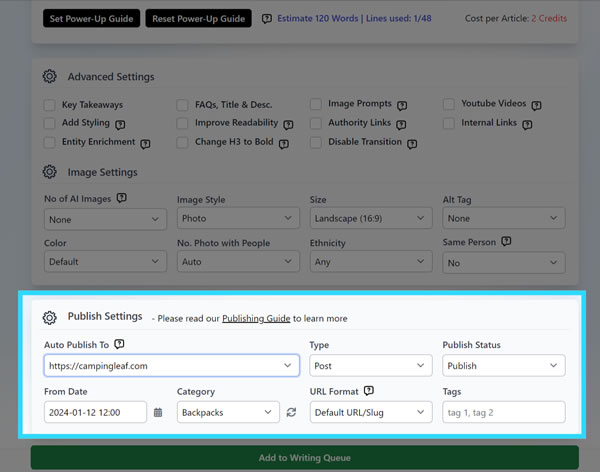
The WordPress plugin connects one or many sites in seconds. Articles publish or schedule directly from Agility Writer with meta titles, descriptions, and focus keywords pre-populated for Yoast, Rank Math, and AIOSEO.

WordPress Integration workflow detail

Everything you get with WordPress Plugin

Multi-site connect

Schedule queue with time-zone awareness

Auto-populate Yoast / Rank Math / AIOSEO fields

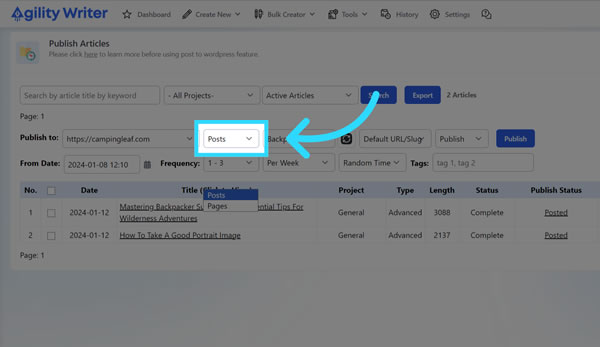
Publish as post or page

Retry handling on failed pushes

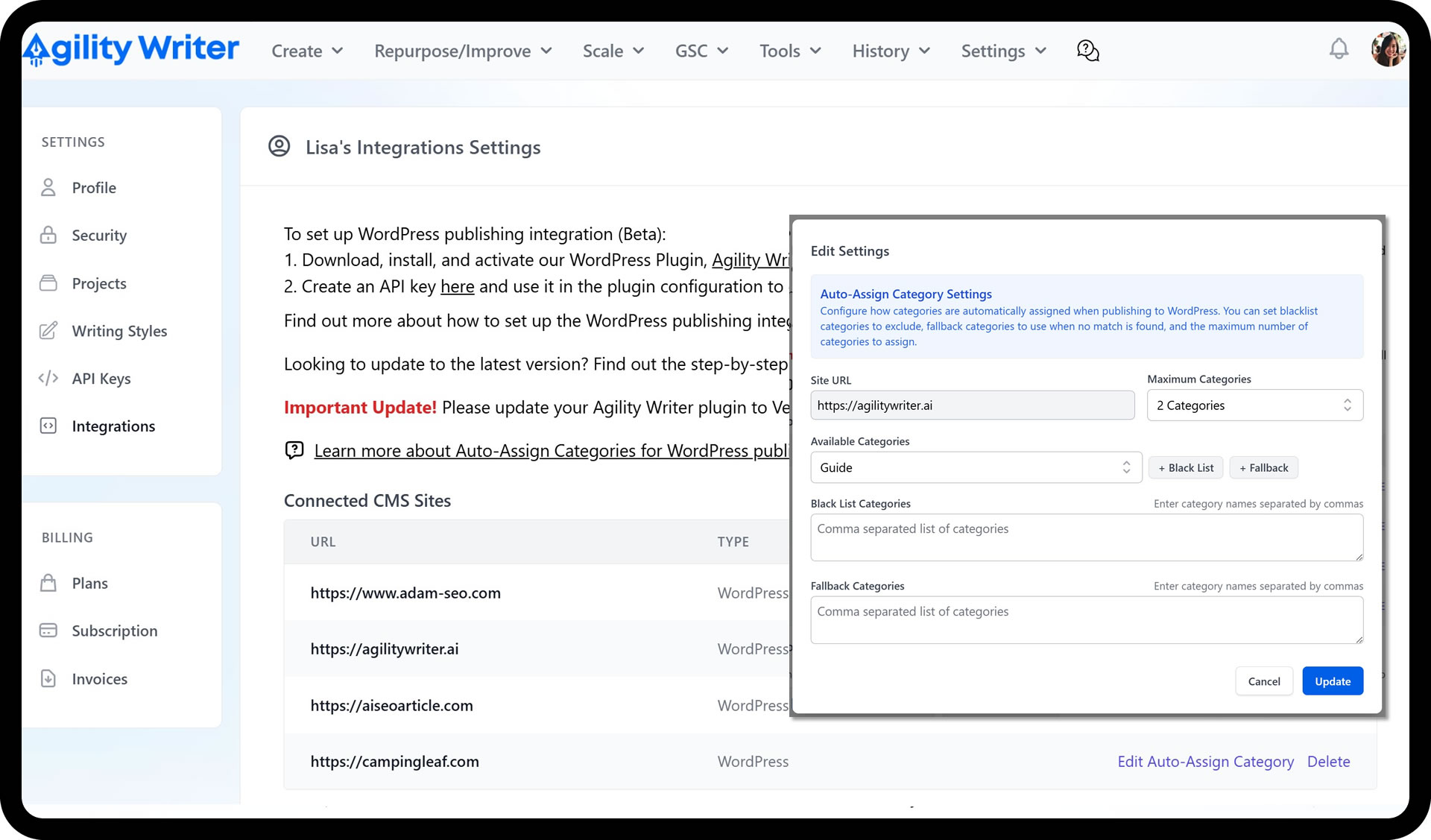
WordPress Integration screenshot 1
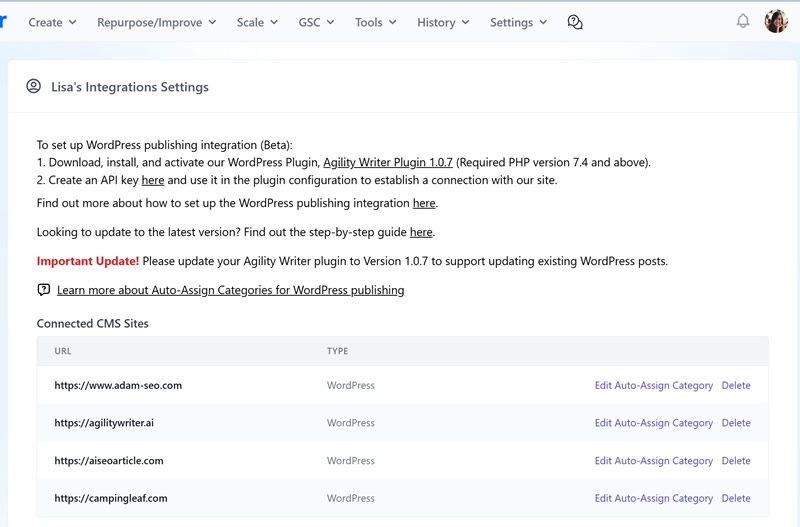
WordPress Integration screenshot 2
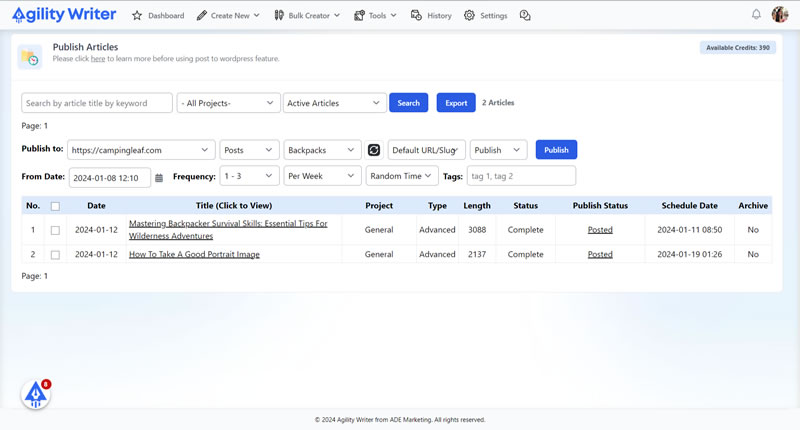
WordPress Integration screenshot 3
WordPress Integration screenshot 4

Our WordPress Integration was designed to eliminate the final bottleneck in your content workflow.

Have you ever stared at a massive batch of newly written articles and felt exhausted just thinking about the upload process?

That tedious copy-pasting is exactly why our founder, Adam Yong, drew on his nearly two decades of SEO experience to build a better way.

We created a system that acts like a dedicated assistant to handle all the formatting for you.

You will see exactly how it works in this guide. So, grab a cup of coffee, and let’s go through it together.

What the WordPress Integration plugin actually does

We built this plugin as a lightweight layer over the WordPress REST API. It securely accepts authenticated requests directly from your Agility Writer account. The system automatically creates posts or pages with every single field completely populated.

Our tool fills in the title, body, excerpt, featured image, categories, and tags without any manual input. You will also find all your meta fields configured for top SEO plugins like Yoast, Rank Math, or AIOSEO. Proper metadata formatting directly impacts your search engine visibility.

We handle the heavy lifting so you can focus on your broader strategy. Here is exactly what the plugin automates for your site:

  • Core Content Elements: Titles, body text, and featured images are formatted perfectly for readability.
  • Organizational Tags: Categories and tags are assigned to keep your site structure neat.
  • SEO Meta Fields: Critical data for Yoast, Rank Math, and AIOSEO is synced instantly to save you time.

Most teams use this integration as the final step in their content pipeline. Our clients often generate content using Bulk Mode, preview the drafts, and then push them straight to WordPress. The plugin takes care of the rest.

You never even have to log into your WordPress admin dashboard. Our data shows that automating this final upload step can reduce content production time by up to 70%. A recent 2025 marketing benchmark report noted that 84% of organizations are expanding AI workflows to scale faster.

Since WordPress powers over 43.4% of all websites globally, having a direct pipeline to it gives you a massive advantage. We want to show you the clear difference between the traditional method and our automated approach. Manual uploading always introduces room for human error.

The plugin method keeps everything perfectly synced.

FeatureManual Upload MethodAutomated Integration
Time Per Article10 to 15 minutesUnder 5 seconds
FormattingRequires manual adjustmentsAuto-formats HTML and headers
SEO Meta DataCopy and pasted manuallyPushed directly to Yoast/Rank Math
Human Error RiskHigh risk of missing tagsZero risk of missed fields

Multi-site setup for agencies

Our multi-site architecture was built specifically to support high-volume operators. Agencies running five or more client sites tend to see the largest benefit from this feature. Managing multiple properties manually often leads to disastrous mix-ups, like publishing the wrong article to a client’s blog.

We remove that risk completely by letting you connect each site once with its own unique API key. You simply route your finished articles from Agility Writer to the correct destination at publish time. There are no manual credential swaps required.

Our system ensures you never have to worry about logging in and out of different accounts again. A 2025 agency benchmark study showed that top-performing firms maintain 25% profit margins by heavily utilizing workflow automation. Malaysian digital marketing agencies, in particular, are scaling rapidly to meet the demand for localized content.

Key Benefits for Scaling Agencies

We help these teams eliminate hours of administrative work every single week. If you manage a large portfolio, standardizing your publication process is the easiest way to protect your profit margins. Here are the main advantages of using a centralized publishing hub for your clients:

  • Zero Credential Sharing: You do not have to give freelancers direct access to client admin panels.
  • Instant Routing: Select the target site from a dropdown menu and hit publish instantly.
  • Centralized Tracking: Monitor exactly which articles were sent to which specific domain.

Our platform provides a clear competitive edge for growing content teams. The ability to manage dozens of sites from one dashboard changes how you allocate resources. Your writers can spend more time researching, while the software handles the tedious distribution.

We highly recommend testing this WordPress Integration on a single staging site first. This allows you to see the automated formatting in action before full deployment.

Your team will quickly realize how much easier content distribution can be when the manual work disappears.

Our support team is ready to help you configure your first API connection. Log into your dashboard today to set up your first integration and start saving time.

Start scaling your production now.

Run a WordPress Plugin job on a $1 trial

5 trial credits, full feature access, and cancel anytime. Test WordPress Plugin on your own keywords before you commit to a plan.

  • 5 trial credits, no contract
  • Cancel in two clicks, anytime
  • Credits roll over on annual plans

Why pick WordPress Plugin over the alternatives

Multi-site from day one

Agencies running 5+ client sites connect them all once, then push articles to the right site without copying credentials each time.

All three major SEO plugins

Yoast, Rank Math, and AIOSEO meta fields auto-populate. No manual paste of meta titles or focus keywords.

Scheduling that respects time zones

Schedule posts in the site's local time, not UTC. The plugin handles conversion automatically.

What customers say about Agility Writer

★★★★★

"We went from 0 to 50,000+ organic visits in under 6 months using Agility Writer. The Topical Map Helper and auto-SEO features saved hundreds of hours of manual optimization. It's not just an AI writer, it's an entire content strategy tool."

M
Marcus T.
Content marketing agency
★★★★★

"Bulk Mode let us launch a programmatic SEO site with 180 articles in a single weekend. NeuronWriter scores landed above 80 on every piece without re-edits."

P
Priya R.
Affiliate marketer
★★★★★

"After our HCU drop, G-Smart Optimizer flagged the exact passages Google was penalizing. The before/after diff made the rewrites obvious, and we recovered 60% of lost traffic in two months."

J
James W.
SEO consultant, UK

WordPress Plugin FAQs

How do I connect a WordPress site?
Install the Agility Writer plugin from the WordPress.org repository (or upload the ZIP), generate an API key in your Agility Writer account, paste it into the plugin settings. Connection is one-click after that.
Does it work with WordPress.com?
Self-hosted WordPress (WordPress.org) only. WordPress.com's REST API restrictions prevent the plugin from working on .com sites.
Can I publish to specific categories or tags?
Yes — set default category, tags, and author per site. Override per article from the Agility Writer publish dialog.
What happens if a publish fails?
Failed pushes go to a retry queue. Errors are logged with the failure reason (auth, rate limit, plugin conflict) so you can fix and retry without re-generating the article.
Does the plugin slow down my WordPress site?
No — the plugin only runs when you actively push or schedule from Agility Writer. It's not a constantly-running background job, so there's no measurable impact on site performance.
Available now, start in under 2 minutes

Ready to try WordPress Plugin?

Start your $1 trial. 5 credits, full access to WordPress Integration and every other Agility Writer feature.

Cancel anytime
Credits roll over
Trustpilot 4.7/5